Mac App Development
Native Mac apps that feel like Apple made them.
Swift and SwiftUI apps for macOS, from menu bar utilities to AI desktop tools. We build and sell our own.
Maclip
Our clipboard manager for Mac
What kind of Mac app are you building?
Each shape has different rules on macOS. We pick the architecture before writing code.
Menu bar utility
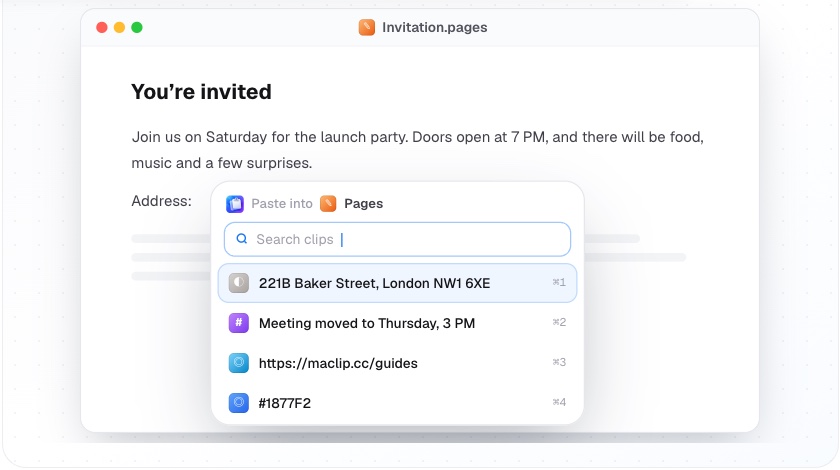
Lives in the menu bar, opens with a shortcut and stays out of the way. The right shape for clipboard tools, timers, launchers and quick capture.
- Global keyboard shortcuts
- Panels at the text cursor
- Launch at login
- Low memory, instant open
Maclip is built this way.
Built and sold by EqviLabs
Maclip
A clipboard manager for Mac with history at the cursor, paste stacks, snippets and a local MCP server for Claude and Cursor.
Read the case study- Opens at the text cursor in any app
- AES-GCM-256 encryption, key in Keychain
- Skips password managers automatically
- Search text inside screenshots
- Touch ID locked boards
- MCP server with per-request approval
Native Swift, Tauri or Electron?
We default to native for Mac-first products and recommend cross-platform only when you need Windows and Linux too.
| Native Swift | Tauri | Electron | |
|---|---|---|---|
| Startup time and memory | Fastest, lightest | Light | Heaviest |
| Looks and feels like macOS | Close | Rarely | |
| Deep macOS APIs (Keychain, Accessibility, menu bar) | Via plugins | Via plugins | |
| Windows and Linux from one codebase | |||
| Reuse web frontend code |
Shipping a Mac app is its own project
We have done it for Maclip, so the parts most teams discover late are part of our plan from day one.
Signing and notarization
Developer ID signing and Apple notarization so users never see a scary warning.
Auto-updates
Sparkle updates with release notes, so every user stays on the latest version.
Licensing and payments
One-time or subscription licenses with Paddle, Lemon Squeezy or Stripe, plus free trials.
Mac App Store
Sandboxing, in-app purchases and App Review handled if you want the store too.
Deep macOS integration. The system features that make an app feel at home on a Mac.
Questions about Mac apps
Not covered here? Email hello@eqvilabs.com.
Do you build native Mac apps or Electron apps?
Native Swift and SwiftUI by default, because they start instantly, use little memory and feel right on macOS. We use Tauri or Electron only when you need one codebase for Mac, Windows and Linux.
Have you shipped a Mac app?
Yes. Maclip, our own clipboard manager for macOS, is a native Swift app with history at the cursor, paste stacks, snippets, on-device encryption and a local MCP server for Claude and Cursor. It sells at maclip.cc.
Can you sell the app outside the Mac App Store?
Yes. We handle Developer ID signing, notarization, auto-updates with Sparkle and license keys through Paddle, Lemon Squeezy or Stripe. We can also submit to the Mac App Store.
Can a Mac app work with AI tools like Claude or Cursor?
Yes. We build local MCP servers inside Mac apps so AI assistants can use your app's data, with the user approving each request. Maclip does this today.
How long does a Mac app take to build?
A focused menu bar utility or single-window app usually takes 3 to 6 weeks. We give you a fixed scope and timeline after a free call.